

Waiting for drone batteries to charge is a huge waste of time, grounding your entire operation. This downtime costs you money and opportunities, especially when clients are waiting and the light is perfect. You can, however, significantly speed up charging by combining the right hardware with smarter strategies.
The fastest way is to use an official, high-power fast charger (e.g., 100W PD) paired with a multi-battery charging hub. This hardware, combined with a battery rotation strategy, allows for nearly continuous operation by dramatically reducing turnaround time between flights.
As a manufacturer of high-performance batteries, I know that for professionals, time is money. Slow charging is a bottleneck that can derail a whole day's schedule. The good news is that you don't have to accept the slow, out-of-the-box charging speeds. By understanding how the charging system works, you can make targeted upgrades and adopt simple habits that get your batteries mission-ready in a fraction of the time.
Is upgrading your hardware the most effective solution?
You're using the standard charger that came with your drone, and it's painfully slow. You suspect there's better gear out there but aren't sure what to prioritize for the best return on investment.
Yes, upgrading your hardware is the most direct and effective way to charge faster. The top priority should be getting a high-wattage official fast charger and a multi-battery charging hub. This combination alone can cut your charging times by more than half.

Your drone's battery is designed to accept power much faster than the basic, included charger can provide. Manufacturers often include a low-power charger to keep the initial purchase price down. As a professional, investing in the proper charging hardware is not a luxury; it's a necessary tool for operational efficiency. At KKLIPO, we design batteries for demanding applications, and we always advise clients to match them with a power delivery system that can keep up.
The Hardware You Need for Speed
Your charging speed is only as fast as its weakest link. To achieve true fast charging, you need to optimize the entire chain, from the wall outlet to the battery itself.
- The Power Adapter (The "Wall Wart"): This is the foundation. A standard charger might be 30W. A fast charger is typically 65W, 100W, or even more. Look for a "PD" (Power Delivery) charger, as this is the fast-charging standard most modern drones use. Upgrading from a 30W to a 100W adapter is the single biggest speed boost you can make.
- The Charging Hub: For anyone with more than one battery, a hub is essential. A good hub does two things. First, it supports high-wattage input from your fast charger. Second, it charges batteries sequentially, not all at once. This means it directs all the power to one battery to charge it as fast as possible before moving to the next.
- The Cable: A surprising number of people use a 100W charger with a cheap cable that can only handle 30W of power. You must use a high-quality USB-C cable rated to carry the full power of your charger (look for a 5A rating for 100W charging).
Are there ways to charge faster without buying new gear?
You have a tight budget but still need to improve your efficiency on-site. Buying a whole new charging setup isn't an option right now, leaving you stuck with long and frustrating wait times.
Absolutely. The most effective no-cost strategy is managing your battery's temperature. A battery charges fastest at room temperature (around 20-25°C). Avoid charging a very hot or cold battery, as the system will intentionally slow down to protect it.
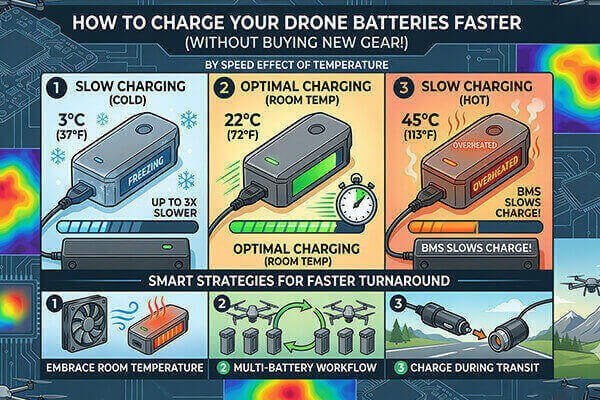
Your battery has a built-in computer, the Battery Management System (BMS). Its primary job is to protect the battery. The BMS constantly monitors temperature. If you try to charge a battery that's hot from a flight, or one that's been sitting in a cold car, the BMS will sense the danger and drastically reduce the charging speed. I learned this the hard way on a winter shoot in Russia. My batteries were ice-cold and took three times as long to charge until I started warming them in the car first.
Smart Strategies for Faster Turnaround
- Embrace Room Temperature: This is the golden rule. After a flight, let a hot battery cool down for 10-15 minutes before plugging it in. In a cold environment, bring the battery inside to warm up to room temperature before charging. This simple habit alone can make a noticeable difference.
- Master the Multi-Battery Workflow: This strategy is about operational efficiency, not single-battery speed. The process is simple:
- Fly with Battery A.
- When you land, immediately put Battery A on the charger.
- Take off with fully charged Battery B. By the time you finish flying with Battery B, Battery A is already partially or fully charged and ready to go. With three or more batteries in rotation, you can achieve nearly continuous flight operations, making the charge time of any single battery irrelevant.
- Charge During Transit: For field operations, a high-power car charger is a game-changer. Use the time you spend driving between locations to charge your next set of batteries. This turns unproductive downtime into productive charging time.
Does long-term battery health affect charging speed?
You've noticed that your older batteries seem to take longer to charge than your new ones. You're wondering if this is a normal part of aging and if there's anything you can do to prevent it.
Yes, a healthy battery with low internal resistance charges more efficiently and quickly. As a battery degrades over time, its internal resistance increases, forcing the BMS to charge it more slowly to manage heat and ensure safety.
Think of internal resistance as friction inside the battery. A new battery has very little friction, so energy flows in easily. An old, degraded battery has a lot of friction. When you try to force energy in quickly, that friction creates excess heat. The battery's BMS is smart enough to detect this. It says, "Whoa, things are getting too hot," and deliberately slows down the charging current to a safer level. This is why your two-year-old battery takes longer to charge than a brand-new one, even on the same charger.
Maintaining Your Battery for Peak Performance
The good news is that you can dramatically slow down this degradation process with proper care. As a solutions provider for industrial clients, we emphasize that maintenance is key to maximizing the return on your battery investment.
- The 50% Storage Rule: This is the most important maintenance habit. If you are not going to fly for more than a few days, do not leave your batteries at 100%. A fully charged battery is under constant chemical stress, which rapidly increases internal resistance. Discharge them to a storage level of 50-60%. Most smart chargers have an automated "Storage Mode" for this.
- Avoid Deep Discharges: Never store a battery empty. This can cause irreversible damage to the cells.
- The 3-Month Maintenance Cycle: About every three months, it's good practice to perform a full cycle on your batteries. Charge them to 100%, then fly them down to about 20%, and then charge them back to your normal storage level. This helps recalibrate the BMS, ensuring it has an accurate reading of the battery's health, which helps it manage charging more effectively.
Conclusion
To charge drone batteries faster, upgrade to a high-power PD charger and a sequential hub. Always charge at room temperature and use a multi-battery rotation to eliminate downtime in the field.