


Your drone's flight time seems shorter, but you can't be sure why. Tracking battery health is vital for mission success, yet the key data feels buried deep inside the app.
You can check the battery cycle count in your DJI app after connecting the drone. In the flight view, tap the settings icon ('...') and navigate to the battery menu. The cycle count will be clearly displayed with other battery health information.

As a battery solutions provider, I know that simply finding this number is only half the battle. For professional operators like Omar, who manage large fleets, understanding what the cycle count means is the key to ensuring safety, reliability, and cost-effective operations. Let's walk through exactly where to find this data and what it tells you about your drone's power source.
Where is the cycle count in the DJI Fly and DJI GO 4 apps?
You know the information is in the app, but you can't find it. Your fleet uses different DJI models, and the separate apps make a simple battery check a frustrating task.
In the modern DJI Fly app, the path is: Settings ('...') > Safety > Battery Info. In the older DJI GO 4 app, you will find it under: Settings ('...') > Battery Icon > Detailed Battery Information.
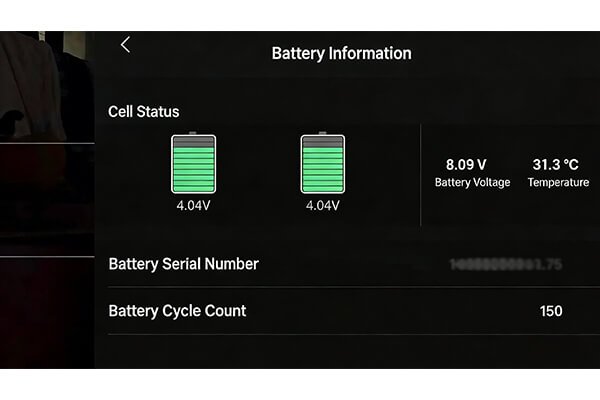
Managing a mixed fleet with both new and older drones is a common challenge. Newer drones like the Mavic 3 or Mini series use the DJI Fly app, while workhorses like the Phantom 4 Pro or Mavic 2 Pro still run on DJI GO 4. Knowing both pathways is essential for consistent fleet management. I always advise operators to make this check a mandatory part of their pre-flight checklist for every single flight. This practice creates a reliable log of battery health over time, which is invaluable data for predicting performance and planning for future battery procurement. It transforms a simple number into a powerful fleet management tool.
| App You Are Using | Step-by-Step Path to Find Cycle Count |
|---|---|
| DJI Fly (Newer models like Air, Mini, Mavic 3) | 1. Enter the flight view. <br> 2. Tap the three dots ('...') in the top-right corner. <br> 3. Select the "Safety" tab. <br> 4. Scroll down to "Battery Info". |
| DJI GO 4 (Older models like Phantom 4, Mavic 2) | 1. Enter the camera view. <br> 2. Tap the three dots ('...') in the top-right corner. <br> 3. Select the battery icon from the side menu. <br> 4. View the detailed information. |
What does a "battery cycle" actually mean?
You see the cycle count, but you assume it's just the number of times you've charged the battery. This common misunderstanding can lead to a false sense of security about your battery's health.
A cycle is not one charge. DJI registers one cycle after a cumulative discharge equal to 75-100% of the battery's capacity. This provides a far more accurate measure of the real stress and wear on the battery.
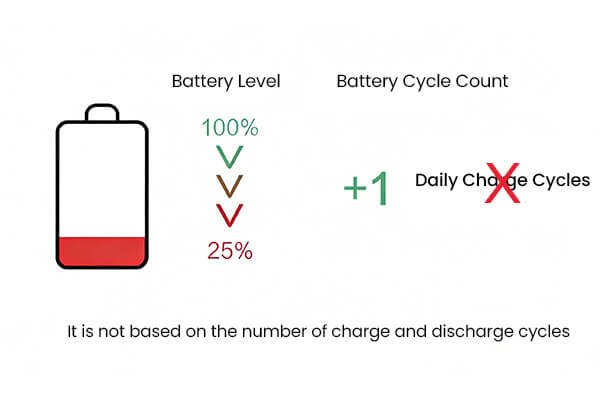
Let's break this down with a practical example. If you fly a fully charged battery (100%) down to 25%, you have discharged 75% of its capacity. The app will log this as one cycle. However, you could also fly from 100% down to 50% (a 50% discharge). The next day, you fly again from 100% down to 75% (a 25% discharge). Even though you charged the battery twice, the total discharge (50% + 25% = 75%) adds up to just one cycle. This method is technically superior because it measures the total energy throughput, which directly relates to the chemical degradation inside the battery cells. It tells you how hard the battery has actually worked, not just how many times it was connected to a charger.
How should the cycle count impact my drone operations?
Your batteries have high cycle counts, but you continue to use them for important missions. This exposes your expensive drone, payload, and entire project to a sudden and catastrophic risk of power failure.
The cycle count is a direct indicator of battery health. As the count rises, performance will decrease. High-cycle batteries must be phased out of critical missions to ensure safety and reliability. They should be retired or used only for training.
For professional operations, a clear battery management policy based on cycle count is not optional—it is essential for risk management. I recommend a tiered system to all my clients to classify batteries and assign them to appropriate missions. This simple strategy maximizes the value you get from each battery while protecting your most important assets. DJI typically warranties their batteries for around 200 cycles. While a well-maintained battery can certainly function beyond this, its performance and reliability are no longer guaranteed. Using a high-cycle battery for a critical flight is a risk that is simply not worth taking.
| Cycle Count Range | Recommended Usage Policy | Risk Level |
|---|---|---|
| 0 - 75 Cycles | Prime / Critical Missions: Use for long-range, over-water, or high-value payload flights. | Low |
| 76 - 150 Cycles | Standard / Daily Operations: Use for routine local jobs where maximum flight time is not critical. | Medium |
| 150+ Cycles | Retire / Training Only: Relegate to ground tests, firmware updates, or low-altitude training. Do not use for client jobs. | High |
Conclusion
Checking your drone's battery cycle count is a simple, data-driven way to manage your fleet's health. Use this number to reduce risk, ensure mission success, and plan for future investments.