


You are preparing for a critical mission, but you are not sure if the battery is truly 100% full. Unplugging too early cuts into valuable flight time, but leaving it connected too long feels like it might damage the battery.
A drone battery is fully charged when all its LED indicator lights stop flashing and turn solid. Shortly after, the lights will turn off. You can also check the official app or charging hub, which will clearly display a 100% or "Full" status.

As a manufacturer of high-performance drone batteries, we design our products with clear, intuitive indicators. Misinterpreting these signals is a common issue that can lead to shortened flights or, over time, reduced battery lifespan. Understanding these simple cues is fundamental to maintaining operational readiness and protecting your investment in power systems. It’s a small detail that has a big impact on performance.
What are the primary visual indicators of a full charge?
You're looking at a row of batteries on a charger, and the lights are blinking. You need to know which ones are ready to go now, but the blinking patterns can be confusing, causing delays.
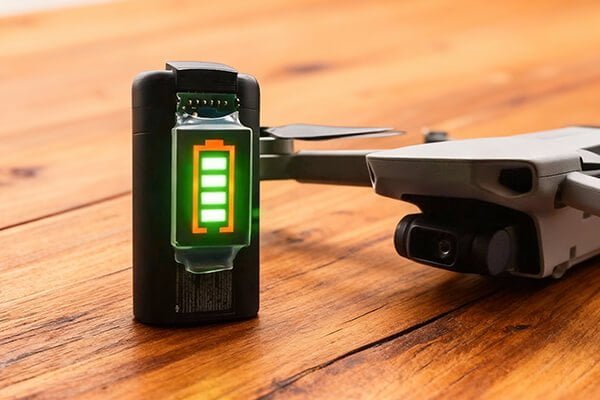
The most reliable visual sign is the battery's own LED lights. During charging, they flash to show progress. When fully charged, all LEDs will become solid green or white for a few moments, and then they will turn off completely.

From my experience working with hundreds of B2B clients, the LED light system is the universal language for battery status. While the specifics can vary slightly between brands, the core logic is almost always the same. It's a simple, effective design that provides at-a-glance information without needing any other equipment. Mastering the reading of these lights is the first skill every professional drone operator should perfect.
Reading the Lights: A Practical Guide
The logic behind the LED indicators is designed to be as simple as a progress bar. For most modern professional drones, like those from DJI, the process is standardized.
- Charging in Progress: The lights will blink in sequence. The number of solid lights indicates the current charge level, while one light will be flashing to show it is actively charging the next segment.
- One solid light, second light flashing: ~25-50% charged
- Two solid lights, third light flashing: ~50-75% charged
- Three solid lights, fourth light flashing: ~75-99% charged
- Charging Complete: All four LED lights will turn solid and stop blinking. After a few seconds, they will all turn off to conserve energy. You can confirm the 100% charge by pressing the battery's power button once; all four lights will illuminate solidly.
| Indicator State | Meaning | Action Required |
|---|---|---|
| Sequential Blinking | Battery is actively charging. | Wait. Do not unplug. |
| All Lights Solid | Charging is complete (100%). | Unplug the battery soon. |
| All Lights Off | Charging is complete and battery is at rest. | Ready for use or storage. |
Always remember, for any equipment you're not familiar with, the user manual is your best friend. A quick check will confirm the exact meaning of the light patterns for that specific model.
Are there more precise methods than just looking at lights?
As a procurement manager, you value precise data. Relying on blinking lights feels inexact, and you need concrete numbers to manage your fleet of batteries effectively and log their performance.
Yes, for exact data, the most precise method is to use the manufacturer's official mobile app or the screen on a smart controller. These interfaces provide a real-time charge percentage, removing all guesswork by showing you a clear "100%".
This is where smart battery technology truly shines. The LED lights are for quick field checks, but the digital readout is for professional management. As a solutions provider, KKLIPO builds batteries with advanced Battery Management Systems (BMS) that communicate this precise data. For a professional like you, Omar, this data is invaluable. It allows for accurate logging, performance tracking over time, and confident pre-flight checks, ensuring every mission starts with a truly full battery.
Leveraging Digital Readouts for Fleet Management
Using an app or smart controller screen gives you more than just a percentage; it provides a window into the battery's health.
- Real-Time Percentage: The most obvious benefit is seeing the exact charge level. There is no ambiguity between 95% and 100%. For missions requiring maximum flight time, this certainty is critical.
- Voltage and Temperature Data: Many apps will also display the voltage of individual cells and the overall temperature of the battery. This is extremely useful for diagnostics. A battery that is charging but getting unusually hot could be a sign of internal degradation.
- Cycle Count: The app tracks how many times a battery has been charged and discharged. This helps you monitor the age and health of your battery fleet, allowing you to rotate older batteries out of critical missions and budget for replacements proactively.
- Error Messages: If there is a problem, such as a damaged cell or a communication error, the app will often give you a specific error code. This is far more helpful than a strange blinking light pattern.
By integrating these digital tools into your workflow, you move from simply using batteries to actively managing them as critical assets.
Is a "fully charged" battery always ready for immediate use?
You have a battery that just finished charging, showing 100%. Your instinct is to use it right away, but you wonder if there are other factors to consider for safety and optimal performance.
No, a 100% charge does not always mean "ready." You must also consider the battery's temperature. A battery that is hot from fast charging should be allowed to cool to ambient temperature before you fly to ensure peak performance and safety.

This is a critical point that many operators overlook. While our batteries and other modern LiPo packs have robust protection systems, the laws of chemistry still apply. A hot battery has higher internal pressure and resistance, which can slightly reduce its performance and, more importantly, accelerate its long-term degradation. I've seen clients in hot climates like the UAE significantly extend their battery lifespan simply by adding a 15-minute cooling-off period to their pre-flight checklist.
Best Practices Beyond "100%"
Knowing a battery is full is just the first step. Proper handling after the charge cycle is what separates amateurs from professionals and ensures the longevity of your expensive assets.
- Unplug Promptly: While modern smart batteries have overcharge protection that automatically stops the current at 100%, it's still bad practice to leave them plugged in for extended periods (e.g., more than 24 hours). This can keep the BMS in a "trickle" state, creating unnecessary stress on the components. Once it's full, unplug it.
- Cool Down After Charging: Fast charging generates heat. A battery that feels warm to the touch should be left to cool for 15-30 minutes before being installed in the drone. This ensures you get maximum power output and reduces stress on the cells during the high-discharge demands of flight.
- Charge for the Mission, Store for the Shelf: Do not keep all your batteries at 100% all the time. A fully charged LiPo battery is in a high-stress state. If you are not flying within the next 24-48 hours, it's far better for its health to discharge it to a storage level of around 50-60%. Most smart chargers and hubs have a "Storage Charge" function that does this automatically. This single habit is the most effective way to prolong battery life.
Conclusion
To know when your drone battery is full, look for all LED lights to go solid, then off. For precision, check the app for a 100% status. Always unplug it promptly and let it cool before flying.