


Overcharging can damage your batteries, while undercharging cuts your flights short. This uncertainty puts your equipment and mission at risk. Here’s how you can know for sure when you're ready to fly.
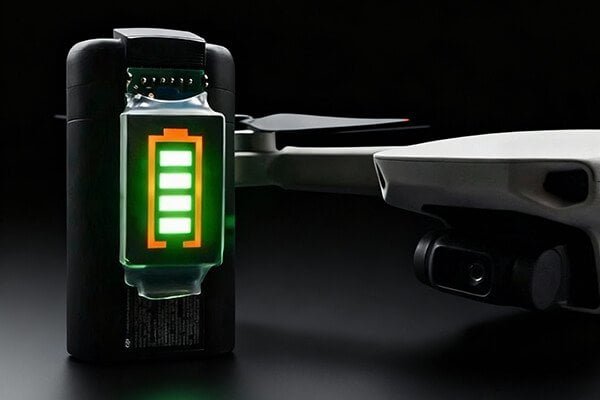
You'll know your drone battery is charged when the indicator lights on the charger turn solid green or all the lights on the battery itself are lit and no longer blinking. For the most accurate reading, check your drone's companion app to confirm it says 100%.
That's the quick answer, but relying on just one signal might not tell the whole story. Different brands use slightly different cues, and for professional operations, you need absolute certainty. Understanding all the methods, from a quick glance at the lights to a precise digital readout, is key to maximizing both your flight time and your battery's lifespan. Let's start with the easiest method: the visual cues.
How can I tell if my battery is full just by looking at it?
You're in a hurry to get back in the air and just need a quick, reliable check. But misreading those blinking lights could mean your next flight is unexpectedly short, ruining a critical shot.
Look for the charger's LED to turn solid green. Alternatively, press the power button on the battery itself; if all four indicator lights are solid and not blinking, it is fully charged and ready to go.
At KKLIPO, we always tell our clients to learn the "language" of their equipment. The lights on your charger and battery are the most direct way the system communicates with you. While the specifics can vary by brand (always check your manual!), the general patterns are quite universal.
Reading the Lights
The charging process is typically shown through a sequence of lights:
- On the Charger/Hub: Most chargers use a simple color code. A red or blinking light indicates that charging is in progress. When the process is complete, the light will change to a solid green. If you're using a multi-battery charging hub, it will typically charge one battery at a time, so only one slot will show green when its battery is full.
- On the Battery Itself: Most modern drone batteries have a power button and a set of four LED lights. While charging, these lights will often blink in a sequence to show the current level. Once the charge is complete, all four lights will become solid. You can check this anytime by disconnecting the battery and pressing the power button once.
Here's a quick guide:
| Device | Charging Status | Fully Charged Status |
|---|---|---|
| Charger | Red or Blinking Light | Solid Green Light |
| Battery | Sequential Blinking Lights | All Lights Solid (not blinking) |
This visual check is your fastest way to confirm a full charge and get back to flying.
Is there a more precise way to know my battery is 100% charged?
Indicator lights are great for a quick check, but they are just an estimate. For a professional mission, you need absolute certainty that you have every second of available flight time before you launch.
Yes, the most accurate method is to use your drone's official app (like DJI Fly). It provides a real-time display of the exact charge percentage, individual cell voltage, and overall battery health, confirming a 100% charge.
For the smart batteries used in most modern drones, the app is your mission control center. It gives you a level of detail that lights alone cannot provide. Connecting your powered-on drone to the app before a flight should be part of your standard pre-flight checklist. This is where you move from "I think it's full" to "I know it's full."
Using Digital Tools for Certainty
-
The Official App: This is the best practice for any drone operator. Once you connect your drone, the app's home screen will prominently display the battery percentage. A "100%" reading is your definitive confirmation. More importantly, the app allows you to drill down into the battery settings to see the voltage of each individual cell. If all cells are balanced and at their peak voltage (e.g., 4.2V for a standard LiPo), you know the battery is not only full but also healthy.
-
Professional Tools (Advanced): For FPV pilots or technicians, a dedicated multimeter or LiPo checker offers the raw data. By measuring the battery's voltage, you can verify its state. A fully charged 4S battery, for example, will read 16.80V (4.20V per cell). This method requires expertise and caution, as accidentally shorting the contacts can be extremely dangerous. It's primarily used for diagnostics, not routine checks.
Beyond knowing it's full, what are the best practices for safe charging?
Knowing your battery is full is only half the battle. Your daily charging habits can either preserve your investment for hundreds of cycles or destroy it in a single season, creating serious safety risks along the way.
Always use the original manufacturer's charger on a hard, non-flammable surface. Never leave a battery charging unattended, and unplug it once it's full. For storage, keep batteries at 40-60% charge in a cool, dry place.

As a battery manufacturer, safety and longevity are our obsessions. A high-performance battery is an investment, and proper care is how you protect it. Modern smart chargers have many safety features, but they should be your backup, not your primary line of defense. Your disciplined routine is what truly matters.
The Golden Rules of Battery Care
- Use the Right Gear: Always use the official charger and cables that came with your drone. Third-party accessories might seem cheaper, but they may lack the proper safety circuits, risking damage to your battery.
- Charge in a Safe Space: Never charge on a flammable surface like a bed, sofa, or carpet. Use a concrete floor, a ceramic tile, or a dedicated LiPo-safe bag. Ensure the area is cool and well-ventilated.
- Supervise the Process: Do not charge batteries overnight or while you are away. While rare, failures can happen, and you need to be there to react quickly if a battery starts to overheat or swell.
- Unplug When Full: Don't leave a fully charged battery connected to the charger for days. While overcharge protection exists, keeping it at 100% for extended periods puts unnecessary stress on the battery's chemistry.
- Respect Storage Charge: A LiPo battery's least favorite state is full or empty. If you aren't flying for more than a few days, use your charger's "storage" function or fly the battery down to about 40-60% (usually 2 solid lights). This is the most stable state and dramatically extends its overall lifespan.
Conclusion
To know your battery is charged, check for solid green lights and confirm 100% in the app. Following safe charging and storage rules will ensure better performance and longer battery life.