


Your drone battery is unresponsive, won't show any lights, and seems completely dead. This frustrating situation can halt your entire operation, grounding a valuable asset over a seemingly small issue.
To reset most drone batteries, connect them to their official charger and leave them for 1-2 hours. This trickle charge awakens the internal protection circuit. If that fails, brand-specific button combinations are the next step to try.

Before you declare the battery a lost cause and start sourcing a replacement, there's a simple process that revives most "dead" batteries. As a battery manufacturer, we see this scenario frequently. The issue is often that the battery is in a deep-sleep or hibernation mode to protect itself. Waking it up requires the right procedure and one key ingredient: patience. Let's walk through the first and most important step you should always take.
What is the universal method to wake up any drone battery?
A battery shows no lights when you press the button and seems completely lifeless. You might think it's destined for the recycle bin. But often, it's just in a deep sleep state to prevent damage.
The universal reset method is to connect the battery to its official charger and wait patiently for up to two hours. The charger will send a small trickle charge to awaken the battery's management system (BMS) before normal charging begins.
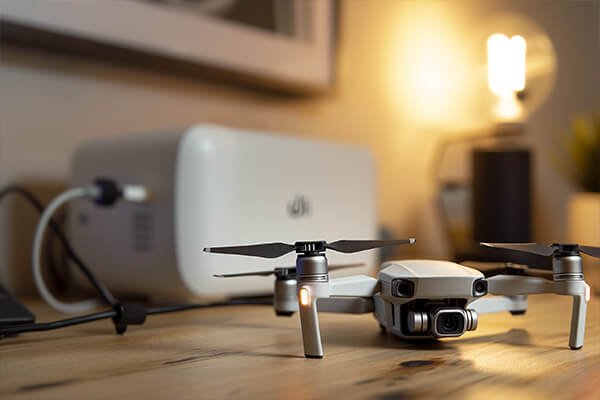
This hibernation state is a built-in safety feature. When a Lithium Polymer (LiPo) battery's voltage drops critically low, its internal Battery Management System (BMS) puts it into a protective self-preservation mode. It shuts down all external communication, which is why you see no lights and get no response. It's not dead; it's protecting itself. Your smart charger is designed to recognize this. It won't apply full power immediately. Instead, it sends a very low current to gently "wake up" the BMS. Once the BMS is active and the cell voltage rises to a safe minimum level, the normal charging cycle will begin, and you'll see the indicator lights start to blink as usual. This process is slow and requires patience. Using a non-original charger is risky, as it may lack this trickle-charge feature and could fail to revive the battery or even damage it.
Are there specific reset procedures for brands like DJI or Autel?
The universal charging method didn't work, and the battery is still unresponsive after a couple of hours. You're starting to lose hope. Don't worry, many top-tier manufacturers have a specific key sequence as a backup plan.
Yes, major brands have unique button-press resets. For DJI, it's typically a short press followed by a long press of the power button for 10-15 seconds. For Autel, it's a short press then an immediate long press for 10-12 seconds.
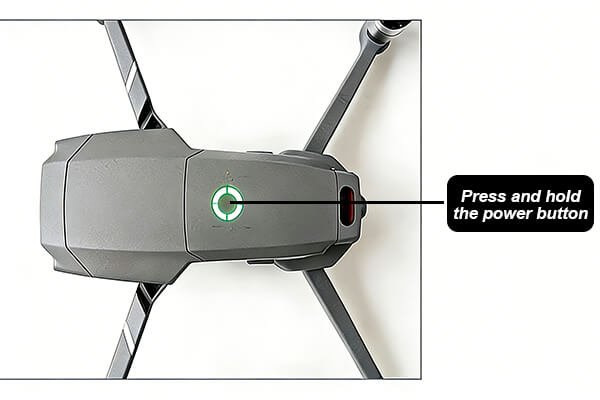
Think of this as a "soft reset" for the Battery Management System, similar to rebooting your computer. It forces the BMS to re-evaluate the battery's status and can clear minor software glitches that might be preventing it from accepting a charge. This is your second line of defense after the patient charging method fails. However, these sequences can vary between models and even firmware versions, so your user manual remains the ultimate authority.
Here is a quick reference for common brands:
| Brand | Reset Procedure | Notes |
|---|---|---|
| DJI | Short press the power button once, then immediately press and hold it for 10-15 seconds until the LEDs cycle. | For batteries without buttons (e.g., DJI Mini series), the only method is the universal long-charge technique. |
| Autel | Short press the power button once, then immediately press and hold it for 10-12 seconds until the LEDs flash simultaneously. | Applies to most EVO series batteries. |
| Skydio | With the battery off the drone, press and hold the power button for 15 seconds. | After the press, re-insert into the charger to check for a response. |
Always perform these actions with the battery removed from the drone.
What if the battery is still completely dead after trying everything?
You've tried the long charge and the specific button resets, but the battery remains a useless paperweight. This is a frustrating and potentially costly outcome, and now you need to understand why it happened and what to do next.
If all reset methods fail, the battery is likely permanently damaged. This can be from an internal BMS failure, a dead cell, or irreversible chemical damage from being left fully discharged for too long. It is time to replace it.

There are several points of no return for a LiPo battery. If a cell's voltage drops below a critical threshold (around 2.5V) and stays there, irreversible chemical damage occurs. The internal structure degrades, and it can no longer safely hold a charge. This often happens when a battery is stored empty for weeks or months. Additionally, the BMS itself is an electronic component that can fail, rendering the battery useless even if the cells are technically healthy. Finally, every battery has a finite lifespan of charge cycles. After hundreds of uses, its ability to hold a charge naturally diminishes.
At this stage, safety is the absolute priority. NEVER attempt to disassemble the battery or "jump-start" it with an unregulated power source like a car battery. The risk of a violent fire or explosion is extremely high. The only safe course of action is to replace it with a high-quality unit from a reliable supplier.
Conclusion
First, try a long, patient charge with the original charger. Next, use brand-specific button resets. If both methods fail, safely dispose of and replace the battery to ensure operational reliability.